
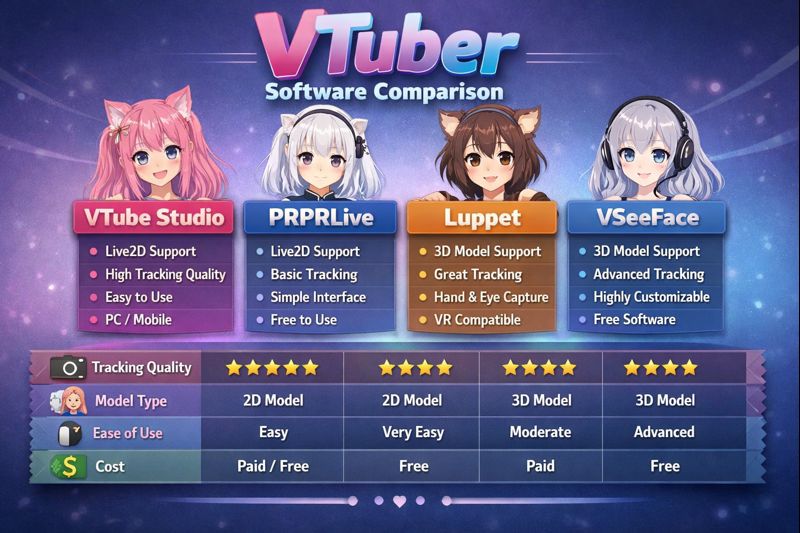
Choosing VTuber software is one of the most confusing steps for new and intermediate VTubers.
There are dozens of tools claiming to be “the best,” but most comparisons online only list features without explaining who each tool is actually for, how they behave in real streams, or where they break under pressure.
This VTuber software comparison cuts through marketing and compares the most widely used VTuber software based on:
- model type compatibility
- tracking quality
- performance impact
- OBS integration
- beginner vs advanced workflows
By the end, you’ll know exactly which VTuber software fits your setup, not just which one has the longest feature list.
If you haven’t finalized your model yet, read VTuber model setup first to avoid choosing incompatible software.
What This VTuber Software Comparison Covers
This comparison focuses on real-world usage, not demo features.
We compare software used for:
- PNGTuber models
- Live2D VTuber models
- 3D VTuber models (VRM / FBX)
We also factor in:
- free vs paid limitations
- hardware requirements
- long-stream stability
Quick Overview: Popular VTuber Software Compared
| Software | Model Type | Best For | Cost |
|---|---|---|---|
| VTube Studio | Live2D | Expressive 2D VTubers | Free / Paid |
| VSeeFace | 3D (VRM) | 3D VTubers | Free |
| OBS Studio | All | Streaming & integration | Free |
| PNGTuber Tools | PNG | Beginners & low budget | Free |
| Unity (VRChat) | 3D | Advanced / VR | Free (complex) |
VTube Studio vs Other Live2D VTuber Software
VTube Studio
Best for: Live2D VTubers who want strong facial expression tracking.
Pros
- Industry standard for Live2D
- Webcam + iPhone tracking
- Expression hotkeys
- Stable OBS output
Cons
- Advanced features require paid version
- Needs proper calibration
👉 Calibration help: vtuber face tracking calibration guide
Who should use it
- Most Live2D VTubers
- Beginners and professionals alike
VSeeFace vs Other 3D VTuber Software
VSeeFace
Best for: 3D VTubers using VRM models.
Pros
- Free and lightweight
- Webcam & iPhone tracking
- Hotkey-based expressions
- Works well with OBS
Cons
- Limited compared to full Unity pipelines
- Requires model optimization
👉 Performance help: 3d vtuber model performance optimization
Who should use it
- Most 3D VTubers not using full VRChat setups
OBS Studio (Why It’s Non-Negotiable)
OBS is not optional VTuber software—it’s the backbone.
What OBS does
- scene layering
- audio routing
- streaming to Twitch & YouTube
- overlays, alerts, recording
OBS works with every VTuber software listed.
👉 Deep integration guide: vtuber software obs integration
PNGTuber Software Comparison
PNGTubers do not need facial tracking software.
PNGTuber Tools (Generic Category)
Best for: beginners, low-end PCs, voice-focused content.
Pros
- Extremely low CPU usage
- Fast setup
- Free
Cons
- Limited expression depth
- Less immersive
👉 Setup guide: pngtuber reactive image setup obs
Unity vs Standalone VTuber Software
Unity (Advanced Only)
Best for: VRChat VTubers, full-body tracking, complex scenes.
Pros
- Maximum customization
- Full VR & mocap support
Cons
- Steep learning curve
- High hardware demand
- Overkill for most VTubers
👉 Lag fix: 3d vtuber model lag fix
Recommendation
Only use Unity if you know exactly why you need it.
Free vs Paid VTuber Software (Real Difference)
| Area | Free Software | Paid Software |
|---|---|---|
| Stream quality | High | High |
| Expression depth | Medium | High |
| Setup difficulty | Low | Medium |
| Required to start | ❌ No | ❌ No |
Paid software improves workflow and polish, not basic viability.
👉 Cost planning: vtuber setup cost
Which VTuber Software Is Best for Beginners?
Best beginner stack:
- VTube Studio (Live2D) or PNGTuber tool
- OBS Studio
Why?
- simple setup
- massive community support
- easy troubleshooting
👉 Beginner guide: vtuber software for beginners
Which VTuber Software Is Best for Performance?
Best performance choices:
- PNGTuber tools (lowest load)
- VSeeFace (optimized 3D)
Worst performance issues usually come from:
- poor calibration
- bad OBS settings
- unoptimized models
👉 Fix guide: vtuber low fps fix
Common Mistakes When Comparing VTuber Software
Mistake 1: Choosing Based on Features Alone
More features ≠ better streams.
Mistake 2: Ignoring OBS Compatibility
If it doesn’t integrate cleanly with OBS, it’s not viable.
Mistake 3: Overbuilding Too Early
Advanced software before mastering basics leads to burnout.
👉 Related: vtuber setup for beginners
VTuber Software Comparison by Use Case
- Fast debut → PNGTuber software + OBS
- Expressive 2D → VTube Studio
- 3D avatar streaming → VSeeFace
- VRChat / full body → Unity
Final Verdict
There is no single “best VTuber software.”
The best choice depends on:
- your model type
- your hardware
- your streaming goals
Most VTubers succeed by:
- starting simple
- mastering setup
- upgrading only when needed