
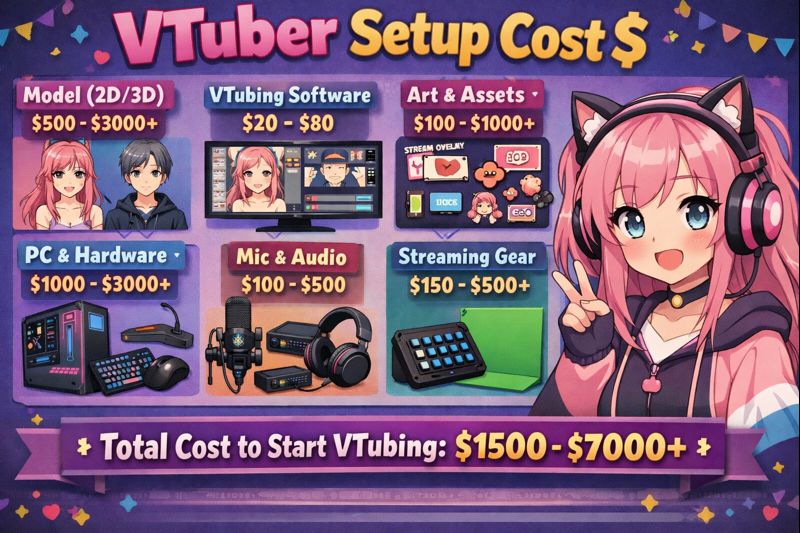
The cost of becoming a VTuber doesn’t stop at commissioning a model.
Many creators are surprised when their avatar looks great in preview—but lags, desyncs, or breaks once they go live. That’s because VTuber setup cost includes hardware, software, tracking calibration, OBS configuration, and performance optimization—not just the model itself.
This guide breaks down exactly how much VTuber setup costs, what you actually need at each stage, and how to plan your budget without wasting money.
If you already have a model but haven’t set it up properly yet, this page will save you time, money, and frustration.
What Does “VTuber Setup Cost” Actually Include?
VTuber setup cost covers everything required to make your model track correctly, stream smoothly, and stay stable in real broadcasts.
A complete setup includes:
- Camera & tracking hardware
- PC performance requirements
- Tracking and VTuber software
- OBS integration
- Calibration and testing
- Optimization and fixes
👉 Related guide: vtuber model setup
VTuber Setup Cost Breakdown (Full Overview)
1. Camera & Face Tracking Cost
Your tracking input has the biggest impact on how “alive” your VTuber feels.
Webcam setup
- Cost: $30–100
- Pros: Cheap, easy
- Cons: Limited depth, less expressive
iPhone Face ID tracking
- Cost: $300–800 (used or new)
- Pros: Best facial accuracy, smoother motion
- Cons: Higher upfront cost
👉 Internal link: vtuber webcam vs iphone
Typical camera budget: $50–600
2. PC & Performance Requirements Cost
Your PC determines whether your model runs smoothly or stutters.
Budget ranges:
- Low-end setup: $0 (existing PC)
- Recommended VTuber PC: $600–1,200
- Advanced dual-PC setup: $1,500+
Important factors:
- CPU (tracking + OBS load)
- GPU (Live2D / 3D rendering)
- RAM (16GB recommended)
👉 Internal link: vtuber setup pc requirements
3. VTuber Software Cost
Most VTuber software is either free or low-cost—but choosing the wrong stack can cost you stability.
Common software:
- PNGTuber tools: Free – $10/month
- Live2D tracking software: Free – $20/month
- 3D tracking tools: Mostly free
OBS Studio: Free
👉 Supporting pages:
- best vtuber software
- vtuber software for beginners
- vtuber software obs integration
Typical software cost: $0–30/month
4. VTuber Model Setup & Calibration Cost
This is where many creators under-budget.
Includes:
- Face tracking calibration
- Expression tuning
- OBS scene setup
- Audio sync configuration
If done yourself:
- Cost: $0
- Time cost: High
If done professionally:
- Cost: $50–300 (one-time)
👉 Internal links:
- vtuber face tracking calibration guide
- vtuber obs sync issue
5. Lighting Setup Cost (Often Ignored)
Lighting directly affects tracking accuracy.
Budget options:
- Desk lamp setup: $20–40
- Ring light: $40–80
- Softbox / key-fill setup: $80–150
Bad lighting causes:
- Mouth tracking issues
- Eye flickering
- Tracking loss
👉 Internal link: vtuber lighting setup
6. Performance Optimization & Fixes
No setup is perfect on the first try.
Common fix costs:
- Physics tuning
- FPS optimization
- Stutter and lag fixes
DIY: $0
Professional help: $50–200
👉 Helpful fixes:
- vtuber low fps fix
- vtuber lag when streaming obs
- vtuber stream stuttering fix
Total VTuber Setup Cost (Realistic Ranges)
Beginner VTuber Setup Cost
- Webcam
- Single PC
- Free software
- DIY setup
Total: $100–300
👉 Related: vtuber setup for beginners
Mid-Range VTuber Setup Cost
- iPhone tracking
- Decent PC
- Better lighting
- Some paid tools
Total: $400–1,000
👉 Related: vtuber setup low budget
Professional VTuber Setup Cost
- iPhone + backup camera
- High-end PC or dual PC
- Advanced lighting
- Professional setup service
Total: $1,200–2,500+
👉 Internal link: hire vtuber setup service
Hidden VTuber Setup Costs You Should Plan For
These costs often surprise creators:
- Replacement lighting
- Software subscriptions
- PC upgrades
- Setup troubleshooting time
👉 Must-read: vtuber model hidden costs
Always keep a 10–15% buffer in your setup budget.
How to Reduce VTuber Setup Cost Without Hurting Quality
Smart savings:
- Buy used iPhones
- Start with webcam, upgrade later
- Optimize before upgrading hardware
- Learn basic OBS setup first
Bad savings:
- Skipping lighting
- Ignoring calibration
- Using unsupported software
- Overloading low-end PCs
VTuber Setup Cost vs VTuber Model Cost (Important Difference)
Many creators confuse these two.
- VTuber model cost = avatar creation
- VTuber setup cost = making the avatar actually work
A $2,000 model with a $0 setup often looks worse than a $300 model with proper setup.
👉 Supporting page: vtuber model cost
VTuber Setup Cost Checklist (Save This)
Before going live, confirm:
- Camera chosen and tested
- PC meets requirements
- Software installed correctly
- Tracking calibrated
- OBS scenes tested
- Performance stress-tested
👉 Anchor text: vtuber model commission checklist
Final Thoughts
VTuber setup cost isn’t about luxury—it’s about functionality.
A clean, well-planned setup:
- Improves viewer retention
- Reduces technical stress
- Protects your model investment
- Helps you grow faster
If your model exists but doesn’t perform well, setup—not art—is usually the problem.
Next steps:
- vtuber model setup
- vtuber setup cost
- hire vtuber setup service