
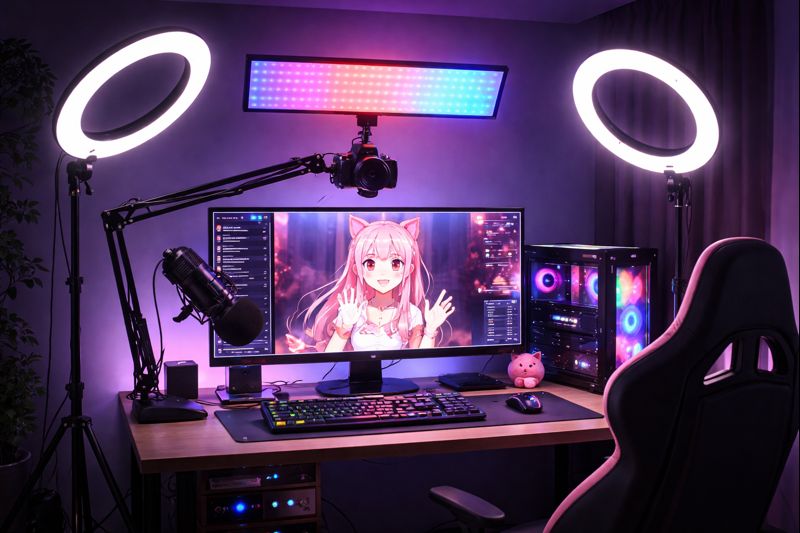
Streaming from a dark room is one of the hardest environments for VTubers.
Poor lighting causes tracking errors, flickering eyes, broken mouth movement, grainy video, and unstable expressions—even if your camera and model are high quality.
This guide shows you exactly how to build a VTuber lighting setup for dark rooms that delivers:
- Stable face tracking
- Natural expressions
- Clean video quality
- Consistent performance during long streams
Whether you use a webcam or iPhone tracking, proper lighting matters more than upgrading your camera.
If your model feels unstable, lighting—not software—is usually the real problem.
Why Lighting Matters More in Dark VTuber Rooms
Face tracking software depends on contrast, shadows, and facial landmarks.
In dark rooms, problems appear immediately:
- Eyes flicker or stop tracking
- Mouth movement breaks
- Head rotation becomes unstable
- Constant recalibration required
This affects both:
- Webcam tracking
- iPhone Face ID tracking
Related reading:
👉 vtuber webcam vs iphone
👉 vtuber face tracking calibration guide
Common Lighting Problems in Dark Rooms
Before fixing your setup, identify the root issues.
Typical Symptoms
- Grainy camera feed
- One side of face darker than the other
- Eyes constantly half-closed in model
- Tracking lost when you turn your head
- Mouth movement delayed or jittery
These problems often cause:
- vtuber model mouth not moving
- vtuber tracking accuracy issues
Best Lighting Principles for Dark VTuber Rooms
Your goal is not “bright.”
Your goal is even, soft, shadow-free facial illumination.
Golden Rules
- Light your face, not your room
- Avoid overhead ceiling lights
- Avoid strong backlighting
- Keep lighting consistent across sessions
Recommended VTuber Lighting Setup for Dark Rooms (Core Layout)
Key Light – Your Main Tracking Light
This is the most important light.
Placement:
- In front of you
- Slightly above eye level
- 30–45° angle from center
Settings:
- Soft diffusion
- Medium brightness
- Neutral color temperature (5000K–5600K)
This single light solves:
- Broken eye tracking
- Mouth recognition errors
- Grainy camera feed
Helpful guide:
👉 vtuber lighting setup
Fill Light – Eliminate Harsh Shadows
In dark rooms, shadows destroy tracking accuracy.
Placement:
- Opposite side of key light
- Lower intensity
- Same height as face
This improves:
- Head rotation stability
- Expression consistency
- Model smoothness
Background Light (Optional but Recommended)
This separates you from a dark wall.
Placement:
- Behind you
- Aimed at wall or background
- Soft intensity
This improves:
- Depth perception
- Cleaner compositing in OBS
- Visual quality for viewers
Ring Light vs Panel Light for Dark Rooms
Ring Light (Best for Beginners)
Pros
- Even frontal illumination
- Easy to mount around camera
- Low setup complexity
Cons
- Flat lighting look
- Limited control over shadows
Best for:
- Webcam users
- Low-budget setups
Related:
👉 vtuber setup low budget
Panel Lights (Best for Professional Setup)
Pros
- Better shadow control
- Adjustable brightness and temperature
- More cinematic look
Cons
- More setup space needed
- Higher cost
Best for:
- iPhone tracking
- Live2D VTubers
- Long-term creators
Related:
👉 best camera for vtuber
Lighting Settings That Improve Face Tracking Accuracy
Brightness Level
- Too dim → tracking lost
- Too bright → face washed out
Ideal range:
Enough to remove shadows, but not reflect in eyes.
Color Temperature
Use:
- 5000K–5600K (daylight range)
Avoid:
- Warm yellow lights (3000K)
- Mixed color lights (breaks skin detection)
Diffusion (Critical for Dark Rooms)
Always use:
- Softbox
- Diffuser sheet
- Frosted panel
Hard light causes:
- Sharp nose shadows
- Eye misdetection
- Mouth tracking failure
Related fix:
👉 vtuber lighting problem
Lighting Setup for Webcam Tracking in Dark Rooms
Webcams are extremely sensitive to lighting.
Minimum Webcam Lighting Setup
- 1 ring light in front
- 1 fill light (optional)
- No ceiling lights
Extra Tips
- Lock camera exposure
- Disable auto white balance
- Increase ISO only slightly
Related:
👉 vtuber setup pc requirements
Lighting Setup for iPhone Face Tracking in Dark Rooms
iPhone tracking is better—but still affected by shadows.
Best iPhone Lighting Configuration
- Two panel lights at 45°
- One soft fill light below camera
- No direct light into Face ID sensors
This improves:
- Eye depth accuracy
- Expression sensitivity
- Long-session stability
Related:
👉 3d vtuber model facial tracking options
👉 live2d vtuber model optimization tips
OBS Settings to Match Dark Room Lighting
Lighting and OBS must work together.
Recommended OBS Camera Settings
- Disable auto exposure
- Lower gain to reduce noise
- Slight contrast increase
- Avoid heavy sharpening
Most “grain issues” come from OBS, not camera hardware.
Related fixes:
👉 vtuber obs dropped frames fix
👉 vtuber obs sync issue
Advanced Lighting Tricks for Small Dark Rooms
Wall Bounce Technique
Aim light at white wall → reflect onto face.
Creates:
- Softer shadows
- Natural skin tone
- Stable tracking
Monitor Glow Trick
Use:
- White background on second monitor
- Low brightness
Acts as:
- Free fill light
- Shadow reducer
Common Mistakes in Dark Room VTuber Lighting
Avoid these:
- Using ceiling light only
- Lighting from below (horror effect)
- Backlight brighter than face
- Mixing warm and cool lights
- No diffusion
These cause:
- vtuber face tracking not working
- vtuber tracking accuracy issues
Best Budget Lighting Setup for Dark VTuber Rooms
Under $50 Setup
- USB ring light
- Desk mount
- Diffuser cover
Under $150 Setup
- 2 LED panel lights
- Softbox diffusers
- Adjustable stands
Related:
👉 vtuber setup under 1000 dollars
👉 vtuber setup cost
Final Checklist: VTuber Lighting Setup for Dark Rooms
Before going live:
✔ Face evenly lit
✔ No harsh nose shadows
✔ Eyes clearly visible
✔ No grain in preview
✔ Tracking stable during head movement
✔ No color temperature mismatch
If any item fails, fix lighting before touching tracking settings.
When You Should Upgrade Your Lighting
Upgrade if:
- Tracking breaks frequently
- Grain visible on stream
- Long streams cause drift
- Viewers complain about visual quality
Better lighting improves:
- Tracking accuracy
- Viewer comfort
- Professional appearance
Final Thoughts
In dark rooms, lighting is not optional—it is your primary tracking system.
Great lighting gives you:
- Stable expressions
- Clean face tracking
- Natural movement
- Higher viewer retention
A perfect VTuber model without lighting will always perform badly.
Treat lighting as part of your VTuber setup pipeline—not an accessory.