
A Live2D VTuber model is often the single biggest investment a VTuber will ever make.
Yet most creators go into commissioning one with no clear understanding of real costs, what affects pricing, or how to avoid overpaying for features they don’t actually need.
This guide breaks down Live2D VTuber model cost in detail—covering realistic price ranges, hidden fees, art vs rigging costs, and how to choose the right tier for your goals, not just your budget.
If you want a model that looks natural on stream, tracks smoothly, and doesn’t need to be rebuilt six months later, this is the guide you should read before paying any deposit.
What Is a Live2D VTuber Model (Cost Context Matters)
A Live2D VTuber model is a fully illustrated 2D character that is cut into layers and rigged to move in real time using face tracking software such as VTube Studio.
Unlike PNGTubers or basic avatars, Live2D models require:
- High-quality character illustration
- Precise layer separation
- Professional rigging (physics + parameters)
- Calibration and testing for real-time tracking
Because multiple specialists may be involved, Live2D VTuber model cost is cumulative, not flat.
➡️ Internal link suggestion: what is a live2d vtuber model explained
Average Live2D VTuber Model Cost (Real Market Ranges)
Here are realistic, current price ranges based on hundreds of commissions—not extreme outliers.
$300 – $600: Entry-Level Live2D Model
Best for beginners who want real facial tracking without premium polish.
Typically includes:
- Half-body model
- Basic expressions
- Limited physics (hair, eyes, mouth)
- Standard head angles (X/Y)
Limitations:
- Stiff movement
- Minimal emotion range
- Often no future upgrade support
Recommended only if you are testing VTubing seriously but cautiously.
$600 – $1,200: Standard Live2D Model (Most Common Tier)
This is the most popular and safest tier for long-term use.
Usually includes:
- Half or full body
- Clean anime-style art
- Natural blinking and mouth movement
- Hair + clothing physics
- Stable face tracking in VTube Studio
Ideal for:
- Twitch and YouTube VTubers
- Monetized streams
- Brand-building creators
➡️ Internal link suggestion: vtuber model setup for smooth streaming
$1,200 – $3,000+: Premium / Professional Live2D Model
This tier is for creators who treat VTubing as a serious brand or business.
May include:
- Highly detailed full-body art
- Advanced physics (hair strands, accessories)
- Wide emotion range
- Full XYZ head rotation
- Alternate outfits and expressions
- Priority support and revisions
At this level, you’re paying for performance quality, not just visuals.
Why Live2D VTuber Models Are Expensive (Cost Breakdown)
Understanding where the money goes helps you avoid bad deals.
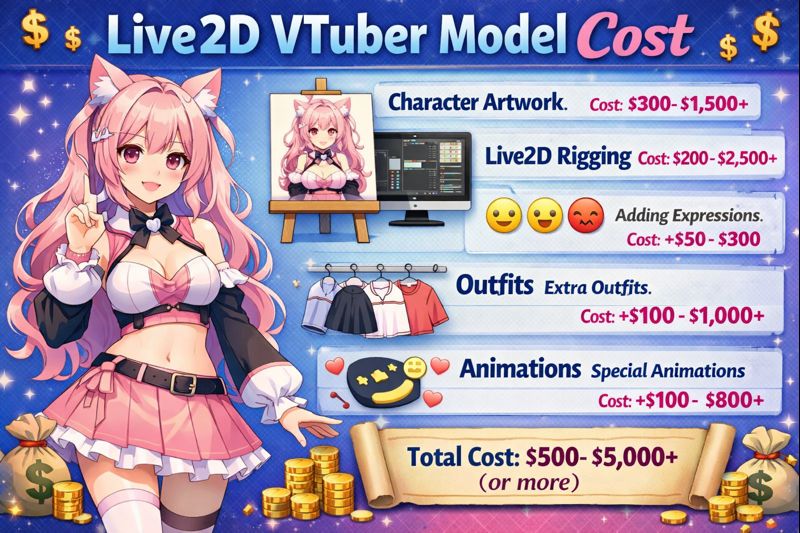
1. Illustration Cost (Art Only)
Art pricing depends on:
- Art style (chibi vs detailed anime)
- Body type (half vs full)
- Outfit complexity
Typical art cost:
- $200 – $800+
Art must be layered correctly for rigging—bad art increases rigging cost later.
2. Rigging Cost (The Real Price Driver)
Rigging is what makes the model feel alive.
Rigging cost depends on:
- Number of parameters
- Physics complexity
- Expression count
- Smoothness requirements
Typical rigging cost:
- $200 – $1,500+
Cheap rigging = stiff, uncanny movement.
➡️ Internal link suggestion: vtuber face tracking calibration guide
3. Expressions, Toggles, and Add-ons
Each extra feature increases cost:
- Emotions (angry, sad, blush)
- Props (glasses, hats)
- Outfit toggles
- Special animations
These are not free extras—always confirm pricing upfront.
4. Commercial Usage Rights
Many beginners miss this.
If you plan to:
- Monetize streams
- Use the model for branding
- Sell merch
You must confirm commercial rights.
➡️ Internal link suggestion: vtuber model ownership copyright and usage rights
Hidden Costs That Inflate Live2D VTuber Model Price
Even a “cheap” commission can become expensive if you’re not careful.
Common hidden costs:
- Paying separately for fixes
- Re-rigging due to poor art layers
- Needing a second artist to repair issues
- Paying extra for future upgrades
Helpful resource:
➡️ vtuber model commission checklist
Live2D vs PNGTuber Cost (Is Live2D Always Worth It?)
Live2D is more expensive—but not always the right first step.
PNGTuber advantages:
- $50–200 total cost
- Zero rigging
- Minimal setup
Live2D advantages:
- Real facial tracking
- Better viewer immersion
- Stronger long-term branding
If budget is tight:
➡️ pngtuber cost explained
How to Budget a Live2D VTuber Model the Smart Way
A realistic beginner-to-serious budget plan:
- $800–1,200 → Safe, high-quality Live2D model
- Reserve extra budget for:
- Lighting
- Microphone
- OBS setup
Supporting guides:
- vtuber setup pc requirements
- vtuber lighting setup
When You Should (and Shouldn’t) Invest in Live2D
Live2D Is Right If:
- You want expressive character acting
- You plan long-term content creation
- You stream regularly
- You care about viewer immersion
Live2D Is Not Ideal If:
- You’re testing streaming casually
- Your PC is low-end
- You don’t want technical setup
➡️ Internal link suggestion: vtuber setup for beginners
Common Live2D Cost Mistakes to Avoid
- Paying for art before confirming rigging quality
- Choosing the cheapest offer available
- Skipping test videos
- Ignoring setup requirements
Many “bad Live2D models” fail due to planning errors, not artist skill.
Quick Live2D VTuber Model Cost Summary
- Entry-level: $300–600
- Best value: $800–1,200
- Professional tier: $1,500–3,000+
- Below $300: high risk
Final Thoughts
A Live2D VTuber model is not just an avatar—it’s a performance tool.
Paying more doesn’t guarantee quality, but paying too little almost guarantees problems.
If you approach Live2D commissions with:
- Clear scope
- Realistic budget
- Proper setup planning
You’ll save money long-term and avoid rebuilding your character later.
Before commissioning, combine this guide with:
- vtuber model commission checklist
- vtuber model setup guide
- hire vtuber setup service
These three together will protect your investment and your sanity.