
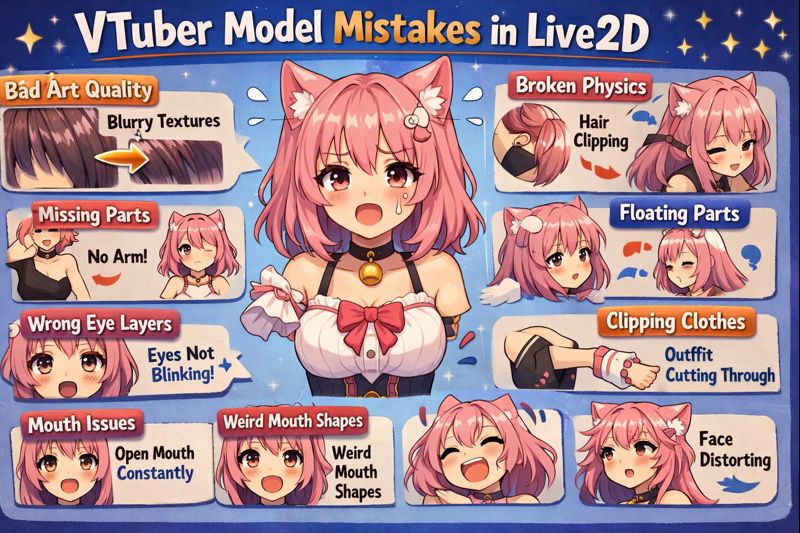
Commissioning or creating a Live2D VTuber model is a major investment—but many creators end up with a model that looks good in screenshots yet feels stiff, broken, or uncomfortable on stream.
The problem is rarely “bad art.”
Most failed Live2D models suffer from avoidable mistakes made during planning, asset preparation, rigging, or setup. These mistakes cost money, delay launches, and often force creators to re-commission parts of the model.
This guide breaks down the most common Live2D VTuber model mistakes, why they happen, how they affect performance, and exactly how to avoid them before they ruin your model.
If you’re still early in the process, start with vtuber model commissions before reading this.
Why Live2D VTuber Models Fail (Even When the Art Is Good)
Across hundreds of real commissions, most Live2D failures fall into one of three categories:
- Poor planning before art begins
- Incorrect asset separation
- Over- or under-rigging without understanding performance limits
These issues compound later during face tracking calibration, OBS integration, and long streams.
👉 Supporting read: vtuber model creation process
Mistake #1: Commissioning Art Without Live2D Separation in Mind
This is the single most common and expensive mistake.
Many artists deliver a “beautiful illustration” that is not properly separated for Live2D rigging.
What Goes Wrong
- Hair merged into the body
- Eyes flattened into one layer
- Mouth interior missing
- Accessories baked into the face
Why This Breaks the Model
Live2D relies on independent layers to deform naturally. Poor separation limits movement and creates unnatural stretching.
How to Avoid It
Before commissioning, confirm:
- Hair is separated into front / back / strands
- Eyes, lashes, brows, and mouth parts are separate
- Clothing layers are clearly defined
👉 Internal link: vtuber model file types & export guide
Mistake #2: Choosing the Wrong Rigging Complexity
More rigging is not always better.
Many creators request advanced physics, extreme angles, and dozens of toggles without understanding their impact.
Symptoms
- Jittery movement
- Lag spikes
- Model instability during long streams
Why It Happens
Complex rigs:
- Consume more CPU/GPU
- Require better tracking input
- Increase calibration difficulty
Best Practice
Start with:
- Natural face angles
- Clean mouth shapes
- Subtle hair physics
Upgrade later when your workflow is stable.
👉 Supporting page: vtuber model hidden costs
Mistake #3: Ignoring Face Tracking Reality
Live2D rigging must match real tracking input, not idealized motion.
Common Problems
- Mouth opens too wide
- Eyes constantly half-blink
- Head movement feels “rubber-necked”
Root Cause
Rig parameters don’t match:
- Webcam quality
- Lighting conditions
- Face shape and expressions
How to Fix
Rigging and setup must be tested together.
👉 Must-read:
- vtuber face tracking calibration guide
- vtuber tracking accuracy issues
Mistake #4: Overlooking Performance Optimization
A Live2D model that works in preview may fail during real streams.
Warning Signs
- FPS drops after 30–60 minutes
- Lag when gaming + tracking
- OBS stuttering
Why This Happens
- Too many physics calculations
- Excessive mesh density
- No “lite” performance version
Professional Standard
Ask for:
- Optimized physics presets
- Reduced mesh density where possible
- A lower-load version for long streams
👉 Internal links:
- vtuber low fps fix
- vtuber lag when streaming obs
Mistake #5: Skipping Rig Test Videos Before Approval
Many creators approve rigs without seeing them move properly.
What Should Be Tested
- Neutral face
- Extreme expressions
- Fast head movement
- Talking while smiling
Why This Matters
Fixing rig issues after delivery is harder, slower, and often costs extra.
👉 Supporting page: vtuber model commission revision limits
Mistake #6: Not Defining Revision Limits in Advance
Unlimited revisions don’t exist in professional commissions.
Common Conflict
- Creator expects endless tweaks
- Artist includes only 1–2 revision rounds
How to Avoid Disputes
Before paying:
- Confirm number of revision rounds
- Define what counts as a “revision”
- Clarify post-delivery support
👉 Internal link: vtuber model commission contract explained
Mistake #7: Poor Lighting During Rigging and Testing
Lighting directly affects tracking accuracy.
Symptoms
- Mouth not moving
- Eye tracking drifting
- Expressions failing randomly
Solution
Always test Live2D models in real lighting conditions, not studio lighting.
👉 Helpful read: vtuber lighting setup
Mistake #8: Expecting Live2D to Fix Bad Setup
Live2D cannot compensate for:
- Bad mic input
- Poor camera placement
- Incorrect OBS settings
Many “Live2D problems” are actually setup problems.
👉 Related guides:
- vtuber model setup
- vtuber obs sync issue
Mistake #9: Choosing the Wrong Artist for Live2D
Illustration skill ≠ Live2D rigging skill.
Red Flags
- Portfolio lacks real tracking demos
- No explanation of physics approach
- No performance optimization mention
What to Look For
- On-stream examples
- Clear technical explanations
- Experience with your tracking setup
👉 Internal links:
- vtuber model commission artist selection tips
- vtuber model commission scam warning
Mistake #10: Rushing the Commission Timeline
Fast commissions often skip:
- Proper QA
- Optimization
- Real-world testing
Typical Consequences
- Broken debut
- Emergency fixes
- Burnout before launch
👉 Supporting page: vtuber model commission timeline expectations
Quick Checklist: Avoid These Live2D VTuber Model Mistakes
Before approving your model:
- ✔ PSD is properly separated
- ✔ Rig tested with real tracking
- ✔ Physics are subtle, not extreme
- ✔ Performance tested in OBS
- ✔ Revision terms clearly defined
- ✔ Lighting tested
- ✔ Files documented and backed up
Final Thoughts
A great Live2D VTuber model isn’t the one with the most features.
It’s the one that:
- Tracks naturally
- Performs reliably
- Feels comfortable to watch
- Fits your real streaming environment
Avoiding these Live2D VTuber model mistakes will save you money, time, and frustration—and help your VTuber debut feel professional from day one.
Recommended next reads:
- vtuber model cost full pricing guide
- live2d vtuber model cost
- vtuber model setup