
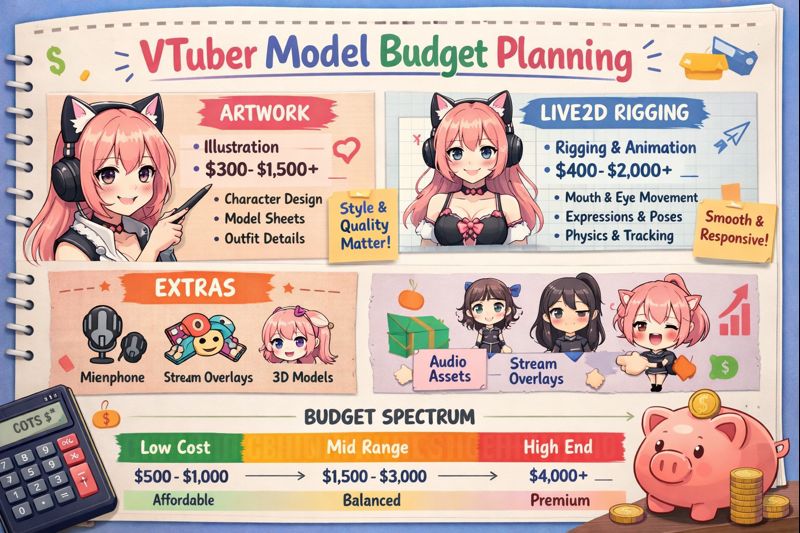
Commissioning a VTuber model is not just an art expense—it’s a long-term investment in your channel, brand, and monetization potential.
Many creators overspend early, under-budget critical steps, or run out of money halfway through setup. Others go too cheap and end up paying twice to fix problems later.
This guide shows you how to plan a VTuber model budget properly, so you know where your money should go, what to avoid, and how to scale your model safely as you grow.
If you want a VTuber model that works smoothly on stream and remains usable long-term, budget planning is not optional.
Why VTuber Model Budget Planning Matters More Than Price
Asking “How much does a VTuber model cost?” is the wrong first question.
The right question is:
How much should I allocate to each stage of my VTuber model lifecycle?
Poor budget planning leads to:
- Broken tracking
- Unusable files
- Legal limitations
- Laggy streams
- Forced re-commissions
👉 Supporting read: vtuber model cost
The 4 Core Budget Categories Every VTuber Must Plan For
A realistic VTuber model budget is split into four categories, not one.
1. Model Creation (Art + Rigging)
This is the cost everyone sees—but not the full picture.
Includes:
- Character design
- Asset creation
- Rigging (PNGTuber / Live2D / 3D)
Typical ranges:
- PNGTuber: $50–300
- Live2D: $300–2,000+
- 3D VTuber: $600–5,000+
👉 Cost breakdown:
- pngtuber cost explained
- live2d vtuber model cost
- 3d vtuber model cost
2. Setup & Calibration (Commonly Under-Budgeted)
This is where many creators get stuck.
Includes:
- Face tracking calibration
- OBS integration
- Software configuration
- Performance tuning
Without proper setup, even expensive models look broken.
👉 Internal links:
- vtuber model setup
- vtuber face tracking calibration guide
- vtuber obs sync issue
3. Optimization & Fixes (Hidden but Inevitable)
No model ships perfectly optimized.
Budget for:
- Physics tuning
- Parameter fixes
- File corrections
- FPS and stutter fixes
Skipping this budget often leads to frustration and rework.
👉 Critical read:
- vtuber model hidden costs
- vtuber low fps fix
- vtuber stream stuttering fix
4. Legal & Usage Rights (Non-Negotiable)
Many first-time VTubers ignore this—and regret it later.
Budget may be required for:
- Commercial usage rights
- Merch permissions
- Rebranding flexibility
👉 Must-read:
- vtuber model ownership copyright and commercial use
Recommended VTuber Budget Allocation (Smart Planning)
A healthy VTuber budget looks like this:
- 60–70% → Model creation
- 15–25% → Setup & calibration
- 5–10% → Optimization & fixes
- 5–10% → Buffer for revisions or upgrades
Creators who plan this way rarely overspend later.
Budget Planning by Experience Level
Beginner VTuber Budget (First Model)
Goal: Get live fast, learn, avoid waste.
Recommended focus:
- PNGTuber or simple Live2D
- Webcam tracking
- Minimal physics
👉 Helpful guides:
- vtuber setup for beginners
- vtuber setup low budget
Growing VTuber Budget (Monetizing or Rebranding)
Goal: Improve expression, stability, professionalism.
Recommended focus:
- Better rigging
- iPhone tracking
- Performance optimization
👉 Supporting reads:
- vtuber webcam vs iphone
- vtuber setup pc requirements
Professional VTuber Budget (Long-Term Brand)
Goal: Scalability, merch, sponsors, events.
Recommended focus:
- Commercial rights
- High-quality rigging
- Advanced setup support
- Optimization variants
👉 Advanced guide:
- hire vtuber setup service
Budget Planning by Model Type
| Model Type | Budget Risk | Notes |
|---|---|---|
| PNGTuber | Low | Great for testing content |
| Live2D | Medium | Most balanced option |
| 3D VTuber | High | Requires strongest planning |
The more complex the model, the more important budget planning becomes.
What NOT to Spend Money On (Early Stage)
Avoid paying extra for:
- Complex toggles you won’t use
- Full-body features without need
- Ultra-detailed physics on low-end PCs
- Rush fees without deadlines
Smart budgeting is about timing, not denial.
Use a VTuber Model Budget Checklist
Before paying any deposit, confirm:
- What is included
- What costs extra
- What rights you receive
- What files are delivered
- What revisions are allowed
👉 Anchor text: vtuber model commission checklist
This single step prevents most budget disasters.
Common Budget Mistakes That Kill Channels
- Spending everything on art, nothing on setup
- Ignoring commercial rights
- Choosing price over usability
- Not reserving a buffer
- Assuming “cheap now” means “cheap overall”
Budget mistakes don’t just waste money—they delay growth.
How Budget Planning Helps You Rank & Monetize Faster
Well-budgeted VTuber models:
- Perform smoothly (higher watch time)
- Look professional (better retention)
- Enable monetization safely
- Scale without replacement
Budget planning directly impacts content quality, not just finances.
Final Thoughts
VTuber model budget planning is not about spending more.
It’s about spending correctly.
Creators who plan their budgets:
- Avoid hidden costs
- Launch faster
- Scale more confidently
- Keep creative control
Before commissioning, review:
- vtuber model cost
- vtuber model hidden costs
- vtuber model budget planning (this page)
Your future self will thank you.