
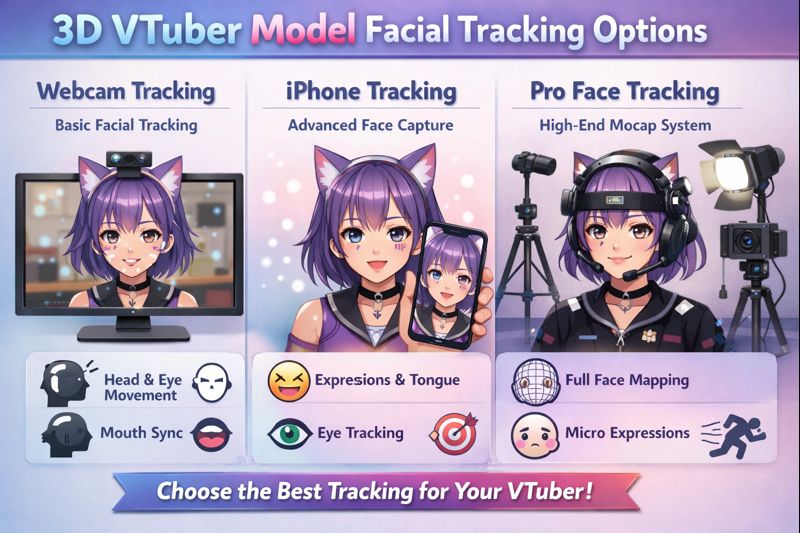
Choosing the right 3D VTuber model facial tracking options is one of the most important decisions you will make as a VTuber.
Facial tracking directly affects:
- how expressive your avatar feels
- how natural your reactions look
- how smooth your stream performs
- how immersive your content becomes
Many creators focus heavily on model art quality but underestimate facial tracking. Even a high-end 3D model can feel stiff, delayed, or uncanny if the tracking solution is poorly chosen or improperly configured.
This guide breaks down all major facial tracking options for 3D VTuber models, compares their strengths and weaknesses, and helps you choose the best solution for your budget, content type, and performance goals.
If your model already feels unresponsive, start with vtuber face tracking not working before reading further.
What Facial Tracking Does in a 3D VTuber Model
Facial tracking converts real-world facial movement into live animation data that drives your 3D avatar.
It controls:
- eye blinking and eye direction
- mouth movement and lip sync
- eyebrow motion
- head rotation
- expression intensity
The quality of facial tracking determines whether your model feels:
- alive and expressive
- delayed and robotic
- overly exaggerated
- visually disconnected from your voice
Main Types of 3D VTuber Facial Tracking Options
There are three core facial tracking categories used in 3D VTuber setups:
- Webcam-based tracking
- iPhone Face ID tracking
- Advanced / hybrid tracking systems
Each option has trade-offs in accuracy, cost, and performance.
Option 1: Webcam Facial Tracking (Most Accessible)
Webcam tracking uses a standard PC webcam to detect facial landmarks.
Pros
- Low cost
- Easy to set up
- Works on most PCs
- No additional devices required
Cons
- Lower accuracy
- Higher latency
- Limited depth perception
- Struggles in poor lighting
Webcam tracking is ideal for:
- beginners
- low-budget setups
- casual content
- PNGTuber-to-3D transitions
However, webcam tracking often causes:
- delayed mouth movement
- weak expression detection
- unstable blinking
👉 Related comparison: vtuber webcam vs iphone
Option 2: iPhone Face ID Tracking (Industry Standard)
iPhone Face ID tracking uses the device’s TrueDepth camera to capture over 50 facial blendshape data points.
Pros
- Extremely accurate
- Low latency
- Stable eye and mouth tracking
- Works well in varied lighting
Cons
- Requires a compatible iPhone
- Higher upfront cost
- Additional setup steps
This is the gold standard for 3D VTubers who want professional-level expression and realism.
Most top-performing VTubers rely on Face ID tracking for consistency and performance.
👉 Supporting setup guide: vtuber face tracking calibration guide
Option 3: Hybrid Facial Tracking Setups
Hybrid setups combine multiple input sources.
Common combinations include:
- iPhone Face ID + webcam body tracking
- Facial tracking + manual expression hotkeys
- Facial tracking + controller input
Why Use Hybrid Tracking
- Reduces tracking loss
- Improves expression control
- Allows custom reactions
- Adds redundancy
Hybrid setups are recommended for:
- advanced VTubers
- long streaming sessions
- high-interaction content
Comparing Facial Tracking Accuracy (Real-World Use)
| Tracking Option | Accuracy | Latency | Stability | Cost |
|---|---|---|---|---|
| Webcam | Low–Medium | Medium | Low | Low |
| iPhone Face ID | Very High | Low | Very High | Medium |
| Hybrid | Very High | Low | Very High | High |
Accuracy matters more than raw resolution when it comes to facial tracking.
How Facial Tracking Impacts Performance
Better tracking does not automatically mean worse performance.
In fact:
- inaccurate tracking causes constant corrections
- unstable input increases CPU load
- poor calibration leads to jitter and lag
Proper facial tracking optimization often improves performance rather than reducing it.
👉 Related fix: 3d vtuber model performance optimization
Lighting: The Hidden Factor in Facial Tracking Quality
Lighting directly affects tracking accuracy.
Poor lighting causes:
- flickering eyes
- unstable mouth detection
- lost tracking during movement
Best practices:
- even front-facing light
- avoid harsh shadows
- neutral color temperature
👉 Dedicated guide: vtuber lighting problem
Facial Tracking Calibration (Where Most Problems Start)
Even the best tracking hardware fails without calibration.
Key Calibration Steps
- neutral face baseline
- mouth open thresholds
- eye openness range
- head rotation limits
Incorrect calibration leads to:
- mouth not moving
- constant half-blinking
- exaggerated expressions
👉 Troubleshooting guide: vtuber tracking accuracy issues
Facial Tracking Software Compatibility
Not all tracking solutions work equally across software.
Before choosing a tracking option, verify:
- VRM compatibility
- blendshape support
- real-time update rate
- OBS integration
👉 Helpful resource: best vtuber software
Facial Tracking for Different Content Types
Chatting / Zatsudan Streams
- High facial accuracy preferred
- iPhone tracking recommended
Gaming Streams
- Balanced performance
- Webcam acceptable if optimized
High-Energy Content
- Hybrid tracking ideal
- Manual expressions add control
Common Facial Tracking Problems (And Their Causes)
| Issue | Likely Cause |
|---|---|
| Mouth not moving | Audio input or calibration |
| Expression delay | Webcam latency |
| Tracking loss | Lighting or camera angle |
| Jittery movement | Over-sensitive parameters |
👉 Fix guide: vtuber model mouth not moving
Beginner vs Advanced Facial Tracking Setups
Beginner Setup
- Webcam tracking
- Default expressions
- Minimal calibration
Advanced Setup
- iPhone Face ID
- Hybrid expressions
- Fine-tuned parameters
👉 Entry point: vtuber setup for beginners
When You Should Upgrade Your Facial Tracking
Consider upgrading if:
- viewers comment on stiffness
- expressions feel delayed
- tracking breaks during long streams
- you are planning a debut or rebrand
CTA:
👉 hire vtuber setup service
Final Thoughts
Facial tracking is not a cosmetic feature—it is the emotional core of your VTuber model.
The right 3D VTuber model facial tracking options give you:
- natural expression
- stronger audience connection
- smoother performance
- higher retention
Great models don’t just look good.
They react like real performers.